Google’s Algorithm Revealed 0

Blog101 | 10:49 AM |

Google’s Algorithm Revealed
Google’s Score = (Kw Usage Score * 0.3) + (Domain * 0.25) + (PR Score * 0.25) + (Inbound Link Score * 0.25) + (User Data * 0.1) + (Content Quality Score * 0.1) + (Manual Boosts) – (Automated & Manual Penalties)
Search Engine Optimisation Key Word Usage Factors
* Keyword in title tags
* Rich Header tags
* Documents rich with relevant text information
* Keyword in alt tag
* Key words in internal links pointing to the page
* Key words in the domain and/or URL
* The order key words appear
Domain Strength / Speed
* Domain Strength
* Domain Speed
* Local/specific domain name
* Quality Hosting
Registration history
* When the Domain was registered
* Strength of the links pointing to the domain
* The topical neighborhood of domain based on the in bound and out bound links
* Historical use and links pattern to domain
* Inbound links and referrals from social media
* Inbound Link Score
Age & Quality of links
* Quality of the domains sending links (non paid)
* Links from Authority Websites
* Quality of pages sending links and relevance
* Anchor text of links
* Link quantity/weight metric (Page Rank or a variation)
* Subject matter of linking pages/sites
* User Data
Historical CTR to page in SERPs
* Time users spend on a page
* Search requests for URL/domain
* Historical visits/use of URL/domain by users
Content Quality Score
* Duplicate content filter
* Order of key words in content
* Content update frequency
* Highlighted and visibility of keywords
* Usability and W3C rules

Googles new NOFOLLOW and how to use it 0

Blog101 | 10:48 AM | , , ,

Hi all,
as you all sure heard google changed how the nofollow works. So in the past it worked like that:
if you had 10 links on a page and 5 of them were nofollow then each of the do-follow links would get 1/5 of the pagerank of the site. So this way you could do pageranksculpting.
But google changed it all last year. So now it is like this:
if you have 10 links and 5 are nofollow then the PageRank is still devided by 10 and every one of the do-follow links gets 1/10 of the pagerank.
As Matt Cuts says the PR of the nofollow links just “evaporates” into nothing. So it makes no sense to use them. He also said that you should just let the PR flow in your site.
Well now I have 2 questions about that:
1) OK I normaly nofollowed pages like “contact us” or “privacy policy” because the are not important for search engines. Well this sucks now because I have them on every page and with the nofollow not working anymore the get a lot of pagerank from every page.
For example if you have an inner page, that only links back to the frontpage and you have 5 links sitting in the footer to pages like “contact us” then the only important link to the frontpage gets 1/6 of the PR.
What I do of course is to add the “noindex” Meta Tag to those unimportant pages like “contact us”.

Now the question: As google does not index them I think all the PR they get will be lost. Is this correct?

2) How are the links on a page counted? From the examples above I said the page has 10 links. What if 8 of the links pointed to the same page of the site.
Would this site get 8/10 of the PR or do all the 8 links count as 1 link because they point to the same page and so the PR going to this page would be 1/3?

Trick to get a FREE PR6 and monitize it with AdSenset 0

Blog101 | 12:52 AM | ,

I will tell you how to make an article directory for free and get a PR6 and get 10,000′s pages indexed in Google almost on autopilot and again it is free!
Go here:
http://www.articledashboard.com/
Download the free software and install it.
Go to their forum.
There are services that will automatically post articles to you.
There is a script that lets you automatically aprove those articles.
You can put adsense in there and you will get a high PR (5-6+!).
You can also advertise anything you like on your site, put links to your other sites on the homepage for fast indexing you name it.
I had 26,500 pages indexed within 4 months and all with Adsense on it. This is all done for free and white hat.
Almost all high ranking article directories are using this and so did I
2 years ago. Just check the article directories and you will see that they all use this.
There is a HUGE potential in this and it is all free.
Now go and install it and monitize you “efforts”.

5 SEO Tips – Get BackLinks For Free 0

Blog101 | 1:16 PM | , ,

The following Tips will help you get more search engine results for your website. They will also teach you how to get backlinks to your site. In other words get other websites linking to yours. These will raise your search engine ranking, and bring you lots of good traffic also. Here are the tips:
  1. Submit Your Site to Google. Visit google webmaster tools, login with your google account, add your site and verify it. After verifying site, it will usually take a week for google to crawl your site. Check the diagnostics section for google’s crawling results.
  2. Submit Your Site to Yahoo. Visit Yahoo to Submit Your Site. Add Your Site. Authenticate Your Site. It takes Yahoo a little longer than google to verify that you own the site, usually a day or two. After authentication it takes Yahoo another 7 days to start crawling your website.
  3. Submit Your Site to MSN. Go to MSN Webmaster. Sign in with Your MSN account. Add Your site. Upload XML file provided to you by MSN to verify your site.
  4. Add Your Website to Web Directories. This will help you get lots of backlinks. Backlinks increase your search engine ranking. Visit The Strongest Links which lists lots of web directories you can submit your site to. Read these common web directory submission mistakes. With many of the directories you have to dig down into their categories before you’ll see a “Submit URL” or “Submit Your Site” link.
  5. Get Backlinks from Similar Sites
    Step 1
    – Build List of a few keywords that you think users will search for to access your site.Step 2 – Also think of related terms and keywords that users might alternatively use when searching for your site. Step 3 – Search google for your terms or keywords. Note url’s of those sites. Visit each one of those sites. Use Firefox SEO plugin to learn more about each site. Find contact information for each site owner. You can usually find this in the contact page. If you can’t find the contact information on the page enter the website’s url in a whois site. If you can find a phone number in the whois site, it’s best to call rather than email. Calling is much more dependable.
    Step 4 – To get site to link to you it’s better to get a one-way link: A link from their site to yours without your site linking back to theirs. Sometimes the only way to get a link is to pay for it. If that’s the case then try to pay for a permanent link and have them sign a contract. Most websites will give you a permanent link for $50. If you don’t or cant pay for a one-way link, then do a link exchange where both your site and theirs link to each other.
    If you want to get a one way link for free from another site, here is how to do it. You must create a friendship with the webmaster. Write an introductory email, build a friendship before asking for link. Another way to do it is to contact webmaster in a very honest direct way including your link in your email. The best way is to call webmaster and talk to them in person. It’s much harder for people to say no on the phone. Let them know that you enjoy their site, value it, tell them about yourself, how you can help their site, maybe by writing content (that their site is currently missing and would be helpful).
    When getting a back link, try to get a deep back link. Instead of just linking to your homepage, try to get links to deep portions of your website. This helps the search engine make other sections of your website more popular and give them a higher rank.
    Also when getting a back link, try to get the webmaster to put a phrase or keyword that you want to rank for in your anchor text. Make sure to change the anchor text for different backlinks. If you don’t and Google sees that you got a 1000 backlinks with the same anchor text they might think you are spamming.

How to Own Google’s 1st Page / Your Blog!!!! Simple Stuff !!! 0

Blog101 | 12:53 PM | , , ,

If you’re looking to get on Google’s first page, it’s really simple… I have my blog listed 7 times on the first page of Google… for a 1,810,000 result search term!!
First, let’s take your niche: I’ll show you some examples::
What do you wanna be on GooglePg1 with ?? what will people type into the Search Engines to find YOUR BLOG ???
Now.. title your blog whatever that term is:
(ex: BlackHat Marketing 101)
Make sure you have 40/50 posts in your blog, related to BlackHat Marketing…
Get a couple backlinks (doesn’t really matter)…
NOW- we’re gonna go sign up with a few Blog Topsites such as:
blogtopsites
blogtoplist
topblogging
blogcatalog
LSBlogs
Blogdigger
MyNewBlog
TopBlogArea
DigNow
TopBlogRateDir
Blogs.com
Blogifer
Skinny
Bloggernow
BlogsOnTop
etc… FIND THEM!!
After you’ve made accounts with all of these places, you’re going to add a new blog (title it, (ex:BlackHat Marketing 101) ..) keep it the same as the blog title… and in the description, start off with:
“BlackHatMarketing 101″…etc…..
Now, after you’ve submitted your blog to ALL of these sites, you’ll have to put the little tracker on your blog somewhere… DO THAT ~!!!!
After you’re done submitting to all the directories, just wait a couple weeks, and you’ll be listed on Google’s 1st page for whatever search term you want!!!
Here’s my Google Page 1: (As you can see I have 6 listings on the 1st page):
for the keywords (iPhone Hacks & Mods)
http://www.google.com/search?hl=en&q=iPhone+Hacks+%26+Mods&btnG=Google+Search&aq=f&oq=
Mine are the :
TopofBlogs/DigNow/BlogCatalog/iPhoneHacks&Mods/iPhoneHacks&Mods Blogspot/ & Everything iCafe (it’s my forum post)…. Listings…
And on the second page, mine are the:
TopBlogArea/iPhoneHacks&Mods/BlogTopList/CellPhoneForum(another post)…Listings
And on the third page , mine are the:
DigNow & BlogCatalog ….listings
Pretty crazy huh??… I get a good amount of traffic from this, and I haven’t even posted on my iPhone site in probably 2 weeks or so!!!… it’s amazing how something so simple can do something so amazing!!!

5 simple SEO tips that you should apply to your website or blog today 0

Blog101 | 12:39 PM | ,

Here are 5 simple SEO tips that you should apply to your website or blog today :
1. Optimize Title Tags
The idea behind the <title> tag is to tell your visitors what your website is about, while at the same time it should have some SE value. For example, a good homepage title would be: Keyphrase or Keywords | Website Name
Your title should also change for each page, on blogs for example: Article Name | Keyphrase | Website Name
2. Optimize <h1> Tag
You should only ever use one <h1> tag on each page, then a mix of <h2> and <h3> tags for article headings, navigation headings, article steps. <h1> is the most valuable though, and you should only use it once on each page, right near the top. The <h1> tag should contain your main keywords or keyphrase.
3. More Content = More Links
The more content you publish, the more links you’ll get. Just make sure your website gets out there, social bookmarking is a good method. If you get lots of links, Google will start to trust you more, and you’ll gain Technorati authority.
Obviously this isn’t so easy when you’ve got a static website rather than a blog, but you can add a blog to your website to get visitors more interested.
4. Offsite SEO
Offsite SEO is linking your your blog or website using your preferred anchor text – in which case you should use the keywords or keyphrase that you’re trying to target. Remember though, your link should be valuable to SE’s and your visitors. Sometimes a link with a keyphrase as the anchor text means more to the visitor than a link with your website name as the anchor text. For example, a link with the title ‘Photoshop Tutorials’ or ‘Photoshop Blog’ may mean more to a visitor than a link that says ‘PhotoshopStar.’
A great way to get more links is to write quality content, then the links should flow in (although these aren’t targeted links, so you won’t be ablet o choose what they link to you as).
5. Validate Markup
Remember to make sure your website markup validates by using the W3 Validator. Remember, readable code is good code! You should also follow guidelines such as using bold text, use headings, etc.

Step By Step PPC Advice for Newbies 0

Blog101 | 12:35 PM | ,

Connecting a Hot Selling Product to a market and then the niches within that market:
When looking for a market or niche to target for your PPC campaign, you should start by selecting a hot selling product and then linking it back to relevant niches (people) within the market that the product is made for. You can find these hot selling products by checking marketplace stats at your trusted affiliate networks.
There are 3 main types of affiliate networks out there:
Digital Product Affiliate Networks
The most popular is:
Digital Products Retailer: Affiliate Program & Sell Online – ClickBank (check Clickbank Analytics for the top selling products)
Physical Product Affiliate Networks
LinkShare | Online Marketing Services, Search Marketing, Lead Generation, Affiliate Marketing
Commission Junction – A Global Leader in Affiliate Marketing, Online Advertising and Search Engine Marketing
CPA Affiliate Networks
Neverblue CPA Network – Cost per action, sale and lead generation affiliate marketing
MarketLeverage
hydra.com
Once you set up your account with any of these affiliate networks, you can identify the offers that carry the highest earning per click and/or the product that is converting for a high number of affiliates.
Here’s the criteria you should use for selecting an offer:
• Proven to convert
• CPA / $/Sale = $25 USD +
• Low refund rate
• Strong sales letter / professional website
• People are hungry for the product or hungry for the solution that the product provides
Once you believe you’ve found a good product/offer that meets the above criteria, you need to review it to determine who the product is relevant to. Here are a few examples that make reference to Click Bank Products:
Truth About Abs (ranked #5 on Click Bank)
Market = Fitness / Fitness for Fat Loss
Niche = People who want six pack abs, a flat stomach, or want to get rid of belly fat
Fat Loss 4 Idiots (ranked #3 on Click Bank)
Market = Weight Loss
Niche = people looking for a fast/easy diet, people who need to lose weight before a special event
Earth 4 Energy (ranked #3 on Click Bank)
Market = Renewable Energy
Niche = people who want to produce their own solar or wind power
So when you’re first looking at your hot selling product – you need to ask these questions: who is this product made for? What problem does this product help solve? Ultimately, you need to tie it back to the people who are most likely to buy it!
Once you’ve identified the niches behind your product, your next step is to determine what keywords the people within your niche would be searching with. You can find these keywords by placing generic keywords that are relevant to your product into Google’s FREE keyword tool.
https://adwords.google.com/select/KeywordToolExternal
For example, with Earth 4 Energy you could enter a keyword like “solar panel(s)” and identify the following keyword opportunities:
buy solar panels, diy solar panel, diy solar panels, home made solar panels, homemade solar panels, how to build solar panels
These keywords are all highly relevant to the product and represent people who want to know how to build their own solar panels. Earth 4 Energy is the ideal solution for them because it will show them how!
The objective behind this lesson was to show you how you can go about finding the right market/niches by simply finding a proven product first and linking it back to the people it is most relevant to.

How To Create "Scroll to Top" button? 0

Blog101 | 2:40 PM | , , ,

Scroll to top button is very useful for bloggers if their have long blogs.To Add "scroll to top" button to your blog ,follow the steps below.
1.Log in to your dashboard--> layout- -> Edit HTML

2.Scroll down to where you see this:
]]></b:skin>
3.Now add below CSS code before  ]]></b:skin>  tag .
/* to top */
#toTop { width:100px;background:#F4FFBF;border:1px solid #ccc;text-align:center;padding:5px;position:fixed;bottom:10px;right:10px;cursor:pointer;color:#666;text-decoration:none; }


4.Now add below code  before  </body>  tag:
<a href="#" id="toTop">^ Scroll to Top</a>


<script src='http://ajax.googleapis.com/ajax/libs/jquery/1.3.2/jquery.min.js' type='text/javascript'></script>
<script type='text/javascript'>
/*-----------------------
* jQuery Plugin: Scroll to Top
* by Craig Wilson, Ph.Creative (http://www.ph-creative.com)
* Bring to you by Zen from http://zenplate.blogspot.com
* Copyright (c) 2009 Ph.Creative Ltd.
* Description: Adds an unobtrusive "Scroll to Top" link to your page with smooth scrolling.
* For usage instructions and version updates to go http://blog.ph-creative.com/post/jquery-plugin-scroll-to-top.aspx
* Do not delete these infomation
* Version: 1.0, 12/03/2009
-----------------------*/

$(function(){$.fn.scrollToTop=function(){$(this).hide().removeAttr("href");if($(window).scrollTop()!="0"){$(this).fadeIn("slow")}var scrollDiv=$(this);$(window).scroll(function(){if($(window).scrollTop()=="0"){$(scrollDiv).fadeOut("slow")}else{$(scrollDiv).fadeIn("slow")}});$(this).click(function(){$("html, body").animate({scrollTop:0},"slow")})}});

$(function() {
$("#toTop").scrollToTop();
});
</script>
5.Now save your template and you are done.Look at the picture below.

How To Delete "Border" when adding images in blogger? 0

Blog101 | 1:39 PM | , , ,

1.Log in to your dashboard--> layout- -> Edit HTML

2.Click on "Expand Widget Templates"
3.Scroll down to where you see this:
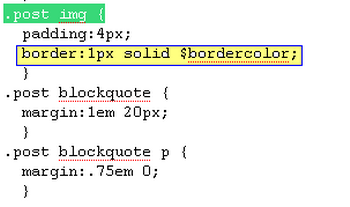
.post img {

4.Now look at the picture below.

5.Delete yellow part ( border:1px solid $bordercolor; ) of the picture from your template.
Note : If you can not find exactly similar code to  border:1px solid $bordercolor;  , delete the part has the word "border"
6.Now save your template and you are done.

How To Add Floating Bar on Top of blogger blog? 0

Blog101 | 12:43 PM | , , ,

1.Log in to your dashboard--> layout- ->Page Elements
2.Click on 'Add a Gadget' on the sidebar.
3.Select 'HTML/Javascript' and add the code given below and click save.
<style type="text/css">
#topbar{
position:absolute;
border: 1px solid black;
padding: 2px;
background-color: lightyellow;
width: 620px;

visibility: hidden;
z-index: 100;
}
</style>

<script type="text/javascript">
/***********************************************
* Floating Top Bar script- © Dynamic Drive (www.dynamicdrive.com)
* Sliding routine by Roy Whittle (http://www.javascript-fx.com/)
* This notice must stay intact for legal use.
* Visit http://www.dynamicdrive.com/ for full source code
*Make it works on blogger by Zen :http://zenplate.blogspot.com
***********************************************/

var persistclose=0 //set to 0 or 1. 1 means once the bar is manually closed, it will remain closed for browser session
var startX = 30 //set x offset of bar in pixels
var startY = 5 //set y offset of bar in pixels
var verticalpos="fromtop" //enter "fromtop" or "frombottom"

function iecompattest(){
return (document.compatMode && document.compatMode!="BackCompat")? document.documentElement : document.body
}

function get_cookie(Name) {
var search = Name + "="
var returnvalue = "";
if (document.cookie.length > 0) {
offset = document.cookie.indexOf(search)
if (offset != -1) {
offset += search.length
end = document.cookie.indexOf(";", offset);
if (end == -1) end = document.cookie.length;
returnvalue=unescape(document.cookie.substring(offset, end))
}
}
return returnvalue;
}

function closebar(){
if (persistclose)
document.cookie="remainclosed=1"
document.getElementById("topbar").style.visibility="hidden"
}

function staticbar(){
barheight=document.getElementById("topbar").offsetHeight
var ns = (navigator.appName.indexOf("Netscape") != -1) || window.opera;
var d = document;
function ml(id){
var el=d.getElementById(id);
if (!persistclose || persistclose && get_cookie("remainclosed")=="")
el.style.visibility="visible"
if(d.layers)el.style=el;
el.sP=function(x,y){this.style.left=x+"px";this.style.top=y+"px";};
el.x = startX;
if (verticalpos=="fromtop")
el.y = startY;
else{
el.y = ns ? pageYOffset + innerHeight : iecompattest().scrollTop + iecompattest().clientHeight;
el.y -= startY;
}
return el;
}
window.stayTopLeft=function(){
if (verticalpos=="fromtop"){
var pY = ns ? pageYOffset : iecompattest().scrollTop;
ftlObj.y += (pY + startY - ftlObj.y)/8;
}
else{
var pY = ns ? pageYOffset + innerHeight - barheight: iecompattest().scrollTop + iecompattest().clientHeight - barheight;
ftlObj.y += (pY - startY - ftlObj.y)/8;
}
ftlObj.sP(ftlObj.x, ftlObj.y);
setTimeout("stayTopLeft()", 10);
}
ftlObj = ml("topbar");
stayTopLeft();
}

if (window.addEventListener)
window.addEventListener("load", staticbar, false)
else if (window.attachEvent)
window.attachEvent("onload", staticbar)
else if (document.getElementById)
window.onload=staticbar
</script>

<div id="topbar">
<a href="#" onclick="closebar(); return false"><img src="http://www.gigaimage.com/images/6gxult9ji6pxr9r7wo.gif" align="right" border="0" />
<a href="YOUR LINK" onclick="closebar(); return true">YOUR TEXT
</div>
Note : Remember to replace YOUR LINK and YOUR TEXT with your details.